|
|
Critique By:
Jim McNitt (K:11246)
3/4/2004 7:49:02 PM
HI Stefan:
Earlier today I was suggesting how important it is to see the faces in children's photos. I still think it is, but "Flow" proves that while it may be important, it's not a necessity when you have great movement and a headful of fair flowing locks.
Stay with the "flow" while you can. Tomorrow they will be teenagers. I know. Yesterday I was warming bottles at 4AM. Today she's 12 going on 20. --jim
|
| Photo By: Stefan Engström
(K:24473)
|
|
|
Critique By:
Jim McNitt (K:11246)
3/3/2004 5:06:35 PM
Layers 101: Hidden Meanings, Hidden Problems
Where would drama be without such tragic characters as Oedipus, Hamlet and Citizen Kane whose lives are warped by dark, unconscious motives? Actually, to find lives warped by dark, unconscious motives, I just glance at my Rolidex. Perhaps even the mirror.
For some, there's doubtless an uncomfortable analogy between the twisted depths of the unconscious and Photoshop's complicated Layer menus.
To fully appreciate the hidden power of PS Layers, you probably had to be there for PS 1 and 2 when 8MB of RAM cost more than a new computer and a 20 MB -- yes, that's Mega, not Giga -- HD was something only the economically advantaged could consider.
PS had just one Layer then -- the Background Layer. If you adjusted the contrast, curves or color balance, the changes were permanent as soon as you saved the document -- much like adjusting print contrast or color balance in the darkroom. The same went for combining images. Yes, it was theoretically possible to save multiple versions -- V1, V2, V3, etc. -- so that you could later revert. But, in practice, even a couple of medium-resolution PS files were enough to fill a state-of-the-art HD.
If you've never worked with PS Layers, there's an easy way to visualize them. Just think of each PS "image" Layer as the equivalent of an enlarger carrier loaded with a negative or transparency. The Adjustment Layers are Photoshop's version of darkroom accessories such as variable contrast filters and color correction filters.
Today, in a single PS file you its very easy to have dozens of image Layers, each with a constellation of non-destructive Adjustment Layers -- with "non-destructive" being the operative adjective.
The whole point of Adjustment Layers is that you can return at anytime and tweak the settings. PS applies the changes WITHOUT permanently affecting a single pixel of the underlying image Layer.
Having struggled mightily to make composites in PS 1 and 2, I sometimes have to remind myself I'm not dreaming when I fire up PS today and see the Layers Palette of a typical project containing several dozen image Layers, each with two or three nested Adjustment Layers.
In PS 7, the Layer>New Adjustment Layer menu offers 11 non-destructive ways of controlling the color, brightness, contrast and density of either an individual image Layer or an entire image with all its Layers. The Layer>Layer Style menu provides another 10 or 11 stylistic options like Drop Shadow, Bevel and Emboss, Pattern Overlay and Stroke.
In my work, there are two Adjustment Layers which I apply to almost every image Layer that I create: Curves and Hue/Saturation. These two Adjustment Layers, plus the Unsharp Mask located under the Filters>Sharpen menu, are the only PS filters many photographers will ever want or need. But they are merely the tip of the PS iceberg.
With Curves, you can tweak image density in incredibly wonderful ways such as adding detail to both blown-out highlights and blocked-up shadows. The Hue/Sat Adjustment Layer is like having an entire color darkroom in a single software panel. You can adjust image hues and their intensity with absolute ease and precision.
There was a time when I made Cibachrome display prints for my portfolio. The color adjustments for each print required many hours experimenting with test strips and incremental color filter adjustments. The same thing can now be done, with infinitely greater accuracy, in 10 or 20 seconds with the Hue/Sat sliders.
There is, of course, one downside to all this power.
It's very easy to get in over your head very fast. By this, I mean that you start doing things in PS that you don't really understand. Then, sooner or latter, you reach a dead end and you lose control of your file. Unpredictable things happen, or, worst of all, nothing happens.
You try to make a selection, run a filter, modify a Layer and nothing, absolutely nothing works the way it should. If you haven't been there, you haven't seriously worked in PS. When you get hopelessly mired, put the project aside for a few weeks, or a few months. Chances are that by the time you return, you'll have learned enough to sort it out.
When things don't work as they should when working with PS Layers, there are a couple places you should immediately look.
The first is for a "hidden selection." If your selection tools won't select, your paint brush won't paint, or your cloning tool won't clone, nine times out of 10, it's because somewhere on some unnoticed layer, you have a few pixels selected that you've forgotten about, or perhaps never even knew about in the first place. The solution is simply to hit Command-D to clear any unseen selections and move on.
If Command-D doesn't work, then another likely scenario is that you have the WRONG layer active in the Layers Palette. Check very carefully to see which Layer is truly selected. Often, you'll discover you've activated an Adjustment Layer, when what you are trying to do is edit the image Layer it modifies.
The advent of Layer Masks has added a new dimension to this problem. When you use Layer Masks, each individual image or Adjustment Layer has two window thumbnails. If you have the wrong window selected, nothing will work as it should -- even though a quick glance at the Layer Palette will confirm that the proper Layer IS active. Well, that's true. But when using Layer Masks, you must not only activate the proper Layer in the Layers Palette, you must also click on the proper window thumbnail as well.
The downside of Layers, then, is their complexity. It takes concerted effort to get the knack of using them. The upside is the almost unlimited creative power Layers afford.
In a strange way, working with Layers can come close to duplicating the delicious anticipation that some photographers report when watching a latent image slowly materialize in the red glow of the dark room. You saw the image in your mind's eye, through the viewfinder and, finally, in inverted form as you exposed your print through the enlarging lens. But none of these glimpses are the same as the thrill, or disappointment, of watching a photographic print as it reveals itself in the developing solution.
When assembling a composite photo, there can be much the same sense of anticipation. Compositing in Layers is the final step in a long process that begins with a visualization how the final print will look and may move through steps that include studio photography and computer graphics. The culmination is a sense of palpable excitement as Layers blend and merge and it becomes evident whether the final result ignites the imagination, or misses the mark.
Sophocles, Shakespeare and Orson Wells continue to fascinate because their best work plumbs the psyche revealing eternal truths. Photography promises a similar potential to turn the camera inward in ways that explore hidden thoughts and motives. PS Layers is a powerful accomplice on the journey. --jim
|
| Photo By: Jim McNitt
(K:11246)
|
|
|
Critique By:
Jim McNitt (K:11246)
2/29/2004 9:26:52 AM
"Photography's Silent Voice"
I find a special kinship between the art of photography and the hidden emotions, the silent voice and the frozen poses of the mime.
Street mimes can be disturbing in much the same way as powerful photographs. Both are intrusive. Both speak a silent language that relies upon nuanced gesture and suggestion. Both have the potential to arrest the gaze, energize the imagination and hold the viewer spellbound.
Like the mime, photography can be intrusive, even aggressive. Turn your back on a street mime, and she will likely copy your gait, mimic your attitude, and give onlookers a good laugh at your expense. The photographer sometimes does the same, only the result is more permanent. I wonder about the impact of Diane Arbus' photos on her subjects, and if regrets about her work might have contributed to her suicide. Susan Sontag once wrote an entire book dedicated to the proposition that photography is intrusive, aggressive, and that to photograph something is in her words "to appropriate it." Sontag may not know the first thing about how to how to take good photos. But she has a point.
We take photos for many reasons. To establish a factual record. To preserve a moment in time. To capture a memory. To share a vision, feeling or idea. Thanks to mass media, photos have the power to change perceptions, perhaps even convictions. A photograph can redefine and re-establish relationships. And not just visual relationships, but the emotional relationships between subjects, models and viewers. The silent voice of photography has changed peoples' minds, their lives, even the course of history.
In subtle ways, then, to take a photo of someone or something is to alter the delicate fabric of relationships that tie that person or thing to us and to the world at large. "I just think it's important to be direct and honest with people about why you're photographing them and what you're doing," writes Mary Ellen Mark. "After all, you are taking some of their soul, and I think you have to be clear about that."
|
| Photo By: Jim McNitt
(K:11246)
|
|
|
Critique By:
Jim McNitt (K:11246)
2/23/2004 3:28:14 PM
Hi Carl:
Looks like an articulated vertabrae after the scavangers have finished lunch. The toning and layer work elevates this from merely macrabre to very interesting. Nice one.
You asked about the texture in "Modigliani's Daughter." It was achieved by using the Overlay Blending mode in PS to superimpose a photo of surface abraisions on a mineral specimen. You can find a detailed account at http://www.photo.net/photodb/photo?photo_id=2130388. --jim
|
| Photo By: Carl Sills
(K:289)
|
|
|
Critique By:
Jim McNitt (K:11246)
2/13/2004 7:55:43 AM
Hi Stefan:
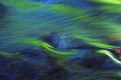
Yes, I see a certain irony in creating an 8x10 neg for blueprint paper. But who can quibble with the results? They are magnificent!
To me the real thing of beauty here is the ameoba-like fractal pattern you've achieved. I've experimented with digital fractal\s via Kai's Frax Flame (KPT effects) filter and never ever have been able to achieve anything that comes close to this -- either in it's balance or in the fact that it combines linear, spheroid and spiral elements all in the same image. Superb, Stefan. Absolutely superb! --jim
|
| Photo By: Stefan Engström
(K:24473)
|
|
|
Critique By:
Jim McNitt (K:11246)
2/12/2004 2:47:28 PM
They get better and better ;--) --jim
|
| Photo By: Marion Luijten
(K:6172)
|
|
|
Critique By:
Jim McNitt (K:11246)
11/20/2003 2:06:06 PM
Hi Peta,
Getting very close to the monitor with powerful reading glasses, I do see the mottling in the original submission. As I think you've figured out, this must have been a PS artifact and not a color calibration problem. The problem is completely corrected in your revised upload.
As for those light Apple screens -- this is not surprising. The default gamma setting on Apple monitors is 1.8 versus 2.2 on Windows monitors. Somewhere in the PN forums I read a rant in which one guy wanted everyone banned from critiquing photos unless they had a cathod ray screen -- no LCD flat screens allowed -- calibrated to certain specific settings, including gamma 2.2. Fortunately, no one took him up on his suggestion. But his basic point, that Browsers and monitors are ALL over the place when it comes to displaying color, is a good one.
|
| Photo By: peta jones
(K:12615)
|
|
|
Critique By:
Jim McNitt (K:11246)
11/19/2003 8:01:22 AM
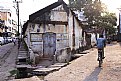
Not only does this capture the "decisive moment" in the boy's expression of wistful determination, it does it with great artistry bringing in shadow play, background shapes and depth. Truly excellent! --jim
|
| Photo By: Aykan OZENER

(K:5996)
|
|
|
Critique By:
Jim McNitt (K:11246)
11/19/2003 6:59:18 AM
This is beautiful and loving work.
The subtlety and restraint of "In the Silence" won me over completely and instantly. I find myself resisting this one a bit, despite it's obvious craftswomanship. That's mainly because the glow effect and supersaturated colors seem to be trying a little too hard to elicit a sentimental response.
For me, reducing the saturation of the foreground figure until it comes closer to matching the dancer would make all the difference in the world. There's a point -- maybe 25 - 50 levels lower on the saturation slider -- where the hue and vibrancy remain, but in a way that is more like a whisper than a shout. I think then I would not hesitate to enter into the magic of this scene willingly and respectfully. --jim
|
| Photo By: Carol Watson
(K:5185)
|
|
|
Critique By:
Jim McNitt (K:11246)
11/19/2003 6:33:45 AM
The arched eyebrow, the arched brim... they say to me: "look out world, this is one girl who knows what she wants and how to get it!" I gotta Lovett --jim
|
| Photo By: Carol Watson
(K:5185)
|
|
|
Critique By:
Jim McNitt (K:11246)
11/19/2003 6:29:35 AM
In a word: sublime!
It's as if we're seeing her world through her eyes.
ps: that's why god created wire cutters...
|
| Photo By: Carol Watson
(K:5185)
|
|
|
Critique By:
Jim McNitt (K:11246)
11/19/2003 6:24:33 AM
Hello Ana:
Delicacate and sensitive -- the self-portrait and the photographer. :-) --jim
|
| Photo By: ana ribeiro
(K:21290)
|
|
|
Critique By:
Jim McNitt (K:11246)
11/19/2003 4:52:48 AM
Hello Yutaka:
I can envision this as a Dandelion at the Masked Ball. --jim
|
Photo By: Yutaka Itinose
(K:21359)
|
|
|
Critique By:
Jim McNitt (K:11246)
11/18/2003 5:27:11 PM
The essence of fall!
|
| Photo By: Naty Z
(K:16486)
|
|
|
Critique By:
Jim McNitt (K:11246)
11/18/2003 5:25:29 PM
Esquisite tones. Makes me feel as if I've stepped into the pages of a Turgenev novel. --jim
|
| Photo By: peta jones
(K:12615)
|
|
|
Critique By:
Jim McNitt (K:11246)
11/18/2003 5:17:18 PM
Hi Paolo:
I find the sky eye-catching rather than distracting. The original composition and your PS elaborations are superb! --jim
|
| Photo By: Paolo Barthelemy
(K:25552)
|
|
|
Critique By:
Jim McNitt (K:11246)
11/18/2003 5:13:46 PM
Hi Adam:
Intense portrait with your trademark "look." -jim
|
| Photo By: ADAM ORZECHOWSKI
(K:7957)
|
|
|
Critique By:
Jim McNitt (K:11246)
11/18/2003 5:12:49 PM
I love the array of expression you captured here!
|
| Photo By: Mário Sousa
(K:16985)
|
|
|
Critique By:
Jim McNitt (K:11246)
11/18/2003 5:07:46 PM
Perfectly composed. Now, if only that foam were on a pint mug. --jim
|
| Photo By: Chris Spracklen
(K:32552)
|
|
|
Critique By:
Jim McNitt (K:11246)
11/18/2003 5:00:46 PM
Hi Katia:
Just wait until you see New Jersey. --jim
|
| Photo By: Katia Cutrone
(K:12940)
|
|
|
Critique By:
Jim McNitt (K:11246)
11/18/2003 4:58:09 PM
Hi Maja: A fascinating image. Is this the valley where there's a monastary atop one of the massive rock outcroppings?--jim
|
| Photo By: Maja Gligoric
(K:13441)
|
|
|
Critique By:
Jim McNitt (K:11246)
11/18/2003 4:52:30 PM
That may look like red paint to you... but to me, it's lunch!
|
| Photo By: Harlan Heald
(K:13990)
|
|
|
Critique By:
Jim McNitt (K:11246)
11/18/2003 4:46:26 PM
I think maybe it needs some seagulls. --jim
|
| Photo By: Harlan Heald
(K:13990)
|
|
|
Critique By:
Jim McNitt (K:11246)
11/18/2003 4:29:54 PM
Drop, or not, it's lovely! --jim
|
| Photo By: Mari Mar
(K:11417)
|
|
|
Critique By:
Jim McNitt (K:11246)
11/18/2003 3:09:12 PM
OK, here's the thing. You sand, I'll paint.
|
| Photo By: Gregory Fiedler
(K:15439)
|
|
|
Critique By:
Jim McNitt (K:11246)
11/18/2003 3:07:54 PM
Probably the only unpierced button left on Long Island. --jim
|
| Photo By: Gregory Fiedler
(K:15439)
|
|
|
Critique By:
Jim McNitt (K:11246)
11/18/2003 3:06:18 PM
Well staged. Mysterious.
|
| Photo By: lowell whipple girbes
(K:13181)
|
|
|
Critique By:
Jim McNitt (K:11246)
11/18/2003 2:35:56 PM
Simple. Effective!
|
| Photo By: Haleh B
(K:3741)
|
|
|
Critique By:
Jim McNitt (K:11246)
11/18/2003 1:38:55 PM
Hi Sandy:
I'm glad you wrote your introductory declaration... it makes the meaning of this both unmistakable and unmistakably powerful. --jim
|
| Photo By: sandy c. hopkins
(K:17107)
|
|
|
Critique By:
Jim McNitt (K:11246)
11/17/2003 3:51:39 PM
A superb shot. A perfect editor's choice! --jim
|
| Photo By: Chris Spracklen
(K:32552)
|
|